 Fix Your Life
Why visible streaks survive and hidden ones die
Habit researchers keep landing on the same boring, powerful truth: environment beats willpower. You check your phone dozens of times a day; whatever lives on that first screen gets dozens of free impressions. A streak buried inside an app needs you to remember it. A streak on the home screen reminds you; every unlock is a tiny confrontation: 17 days. Still going?
There's a second effect. When your streak is public to yourself, visible between the Messages and Safari icons, skipping stops being a private, deniable act. The empty flame would sit right there, on the screen you look at 100 times a day.
Adding the widget, step by step
- Touch and hold an empty area of your home screen until the apps jiggle.
- Tap Edit → Add Widget (the + on older iOS versions) in the top corner.
- Search for the app: e.g. "Fix Your Life", in the widget gallery.
- Swipe to pick a size. Small shows the essentials; medium fits more context.
- Tap Add Widget, drag it where your eyes land first, and tap Done.
Small or medium? Placement matters too
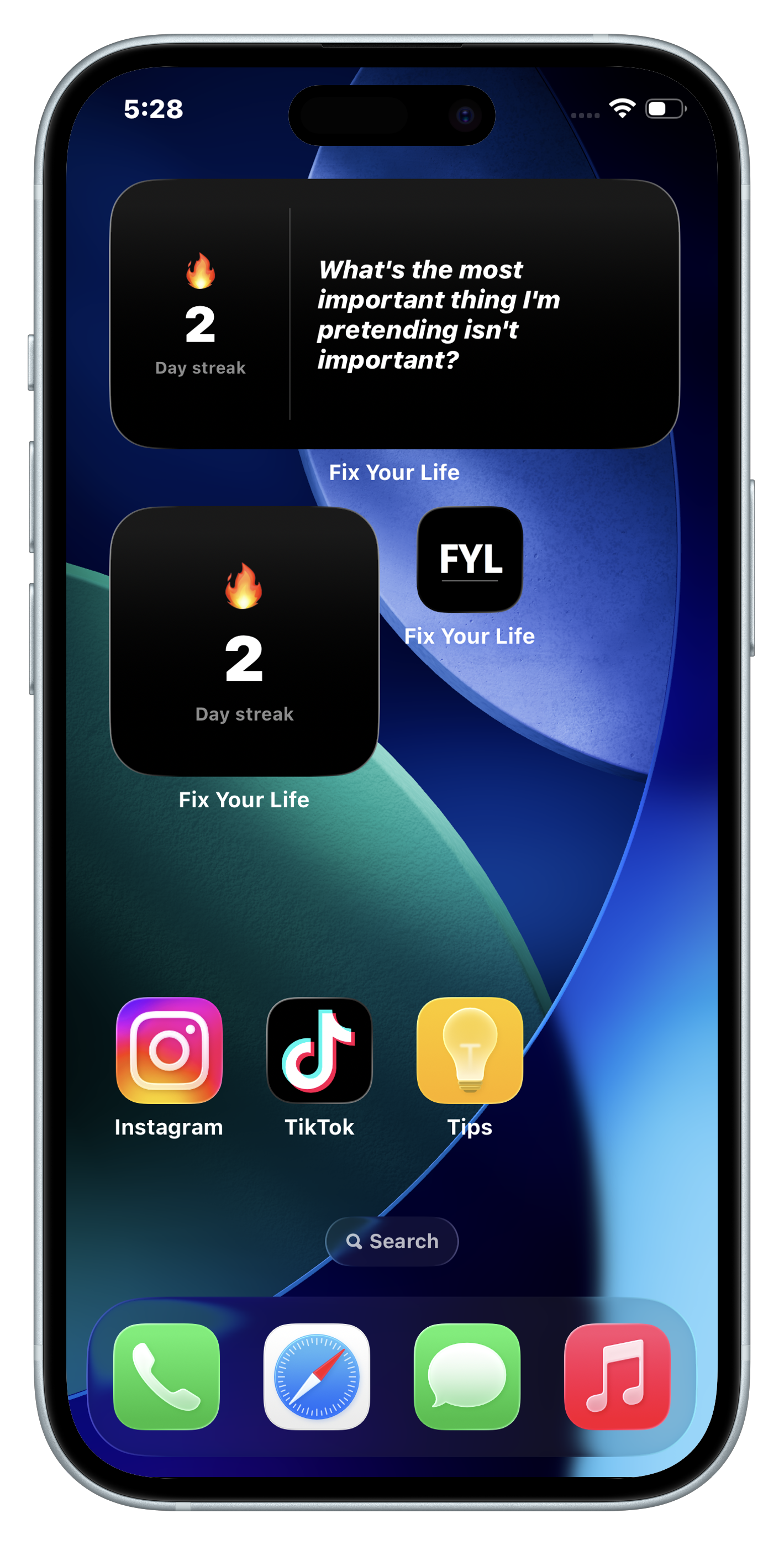
- Small widget: your streak count with the 🔥 flame; a scoreboard. Perfect next to your most-used apps, where you can't miss it.
- Medium widget: streak plus the question of the day. This one doesn't just remind you the habit exists: it starts working on you before you've opened anything. "Are you doing everything necessary to achieve your goals?" between your mail and your camera changes the texture of a phone-unlock.
- Put it on the first screen. A widget on page three is a widget in a drawer. Prime real estate or nothing.
Your home screen is the most-viewed surface in your life. Rent one square of it to the person you're trying to become.
The Fix Your Life widgets
Fix Your Life ships two home screen widgets designed for this exact job:
- Streak widget (small): your current day streak with the flame; the chain you're protecting, always in sight.
- Question widget (medium): streak plus today's confronting question, so the reflection follows you out of the app.
- Both update automatically as you answer your daily alarms, in the same clean black & white design as the app.
Questions people also ask
How do I add a streak widget to my iPhone home screen?
Touch and hold an empty area of the home screen, tap Edit and then Add Widget, search for the app, pick a size, tap Add Widget and place it on your first screen.
Why put a habit streak on the home screen?
Environment beats willpower. A streak inside an app needs you to remember it, while a streak on the home screen reminds you every time you unlock the phone.
Small or medium widget: which is better?
The small widget shows the streak count. The medium one adds the question of the day, so it starts working on you before you open anything.
Put your streak where you can't miss it.
Free to download · 3-day free trial · No ads. Ever.
Download Fix Your Life