
How to export captions without a watermark
Almost every free caption app puts its own name on your video. It is the trade: you get the tool, they get a small advert on everything you post.
Whether that matters depends entirely on what you are making, and it is worth being clear-eyed about rather than assuming either way.
When a watermark genuinely costs you
- Client work. A logo that is not the client's on a video they paid for is a problem, every time.
- Anything you are using as a portfolio piece or an ad.
- Reposting across platforms, where some algorithms have historically down-weighted video carrying another app's branding.
- Building a recognisable channel, where a competing mark in the corner works against the thing you are trying to build.
When it genuinely does not
If you are learning the tool, testing a format, or posting to friends, a small mark in a corner changes nothing. Paying to remove it before you know whether you will keep making videos is money spent on the wrong thing.
Make the first few, see whether the habit sticks, and decide after that.
What Charlatan's free tier actually includes
Free gives you automatic transcription, 17 fonts, the complete style editor and export. It is not a trial and it does not expire.
The export carries a small Charlatan mark in the top-left corner. Everything else about it (resolution, quality, the captions themselves) is identical to the paid export.
How to do it in Charlatan
- Make a few videos on the free tier first. The mark sits in the top-left corner, so you can see exactly what it looks like on your own footage.
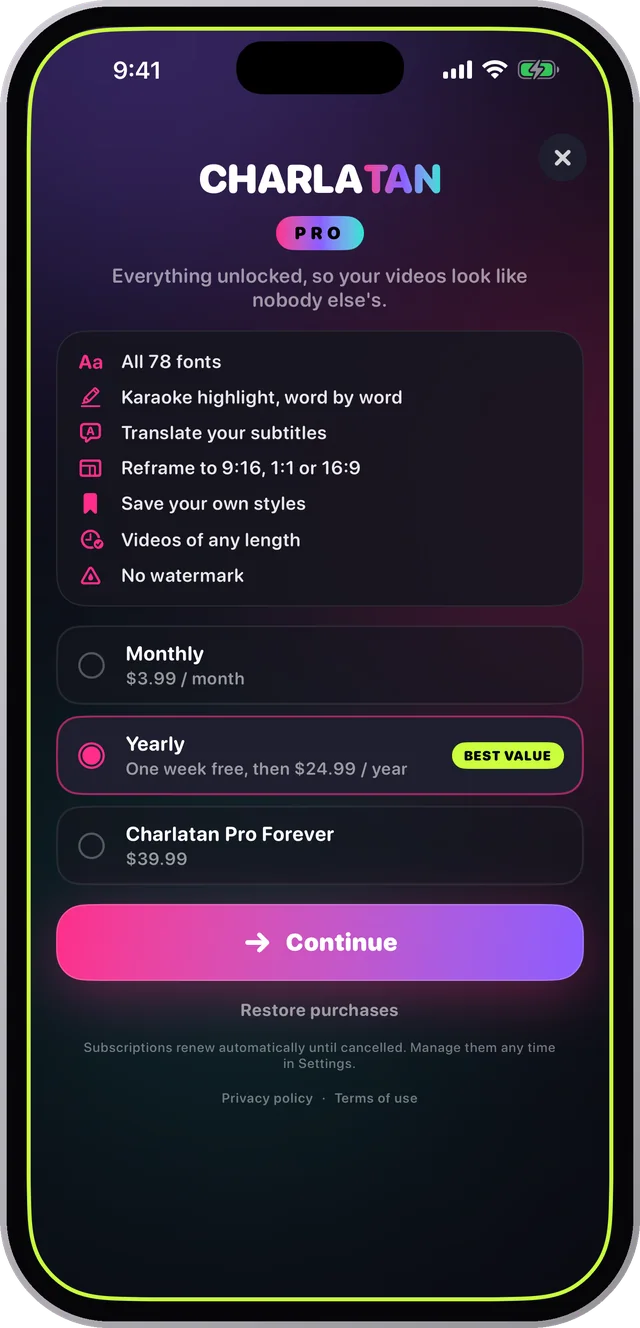
- If you decide it is in the way, open the Pro sheet from the editor.
- Pro removes the watermark and also unlocks all 99 fonts, karaoke highlight, translation, reframing and saved styles: the watermark is not sold on its own.
- Choose monthly, yearly, or the one-time lifetime payment if you would rather not have a subscription.
- Re-export anything you already made. The project is still there, so previous videos can be exported again clean.
Questions people also ask
Does a watermark reduce reach on TikTok or Instagram?
Platforms have historically preferred video that does not carry another app's branding, and TikTok's own watermark is well known to be down-weighted elsewhere. Treat it as a reason to remove it for serious posting, not as a guarantee either way.
Can I remove the watermark from videos I already exported?
Not from the exported file itself, but you do not need to: the project is still in the app, so you can export it again without the mark once Pro is unlocked.